

TABLE OF CONTENTS
How to Turn SOPs and Manuals into Process Maps with AI
- Why Convert SOPs into Process Maps at All?
- From Written Instructions to Visual Workflows: How AI Makes It Easier to Visualise Documented Processes
- How AI Converts SOPs and Manuals into Process Maps
- How Do You Convert an SOP into a Process Map with AI?
- A Practical Example: What Does an SOP Look Like as Process Maps?
- What Do AI Tools for Business Process Mapping Get Wrong?
- What Results Can You Expect?
- What Should You Look for in an AI Process Mapping Tool?
- Where Should You Start?
Summary
AI makes it easier to turn existing SOPs and procedure manuals into visual process maps without manually recreating every workflow. By uploading an existing SOP or process manual to an AI process mapping tool, teams can quickly convert it into an accurate, ready-to-use BPMN-compliant process map. It saves time and resources and shifts focus to validating instead of creating process maps.
You have SOPs already documented, then why do employees still rely on colleagues to understand processes?
Standard Operating Procedures (SOPs) and process manuals are important for creating an understanding of how the work needs to be performed in an organisation to achieve targeted results.
Because these procedures are written in sentences, it becomes difficult to understand how tasks connect, where decisions happen, and how work moves between people and departments.
Business process mapping makes this information easier to understand by visually presenting activities, responsibilities, decisions, and handoffs in a single workflow.
However, converting SOPs and manuals into process maps using traditional methods is also challenging. AI tools for business process mapping eliminate the time and effort required to do this.
Let’s explore how.
Why Convert SOPs into Process Maps at All?
Standard operating procedures are step-by-step instructions on how to perform a specific process. They include tasks in written form and explain what needs to be done to complete a process.
Creating SOPs is important to maintain consistency, store process knowledge, onboard new employees, bring accountability, and manage the overall business processes.
However, having written instructions in place does not always make it easy to understand how a process works from beginning to end.
So, process mapping is the easiest way to understand end-to-end processes. It represents the sequence of activities, responsibilities, and decisions in a more structured way.
Instead of reading long sentences or paragraphs, employees can get the same information efficiently.
These maps are useful for employee training, process reviews, audits, and system implementation projects.
In Australia, APRA’s CPS 230 places emphasis on identifying critical operations, the processes and resources supporting them, and associated risks. Having process maps in place helps Australian organisations understand these processes and gain better visibility into the activities and resources that support critical operations.
From Written Instructions to Visual Workflows: How AI Makes It Easier to Visualise Documented Processes
Now that we know that process mapping is the best solution to visualise processes, the challenge is to convert the existing process knowledge into process maps.
Following the traditional method requires someone to go through process manuals, read SOPs, identify individual tasks, and understand the sequence to manually create process maps.
And when you multiply it by thousands of procedures, you can imagine the amount of time and resources it can take to create a simple process map.
AI-driven process mapping makes it easier to do that.
It can read the existing process document you have, interpret the instructions, identify the steps, roles, and decisions required to complete a process, and organise it into a BPMN-compliant, ready-to-use process map.
This ensures that organisations can make better use of the process information they have. They don’t need to start from scratch.
How AI Converts SOPs and Manuals into Process Maps
The way of converting a process map can be different based on the software you use. But the journey follows the common stages:
1. Upload Process Procedure You Have
You upload the existing SOPs or a manual in any format, such as an image, a PDF, a document file, or any other supported file, including written procedures. No need to start from scratch.
2. AI Extract Process Information
Leave it to AI. AI will identify the sequences, activities, roles and responsibilities, policies, guidelines, decisions, and outcomes.
3. It Structures the Process Flow
It arranges those extracts into a logical sequence with branches and handoffs.
4. Then, It Notates into Ready-to-Use Process Maps
AI starts creating ready-to-use visual diagrams using a standard notation like BPMN faster.
Turn Your SOPs into Process Maps with AI
Convert written procedures into visual BPMN process maps faster with MapAI.
How Do You Convert an SOP into a Process Map with AI? (Step by Step)
AI cannot do everything automatically. Human intervention is necessary. So, the teams need to follow the steps to get the best outcomes:
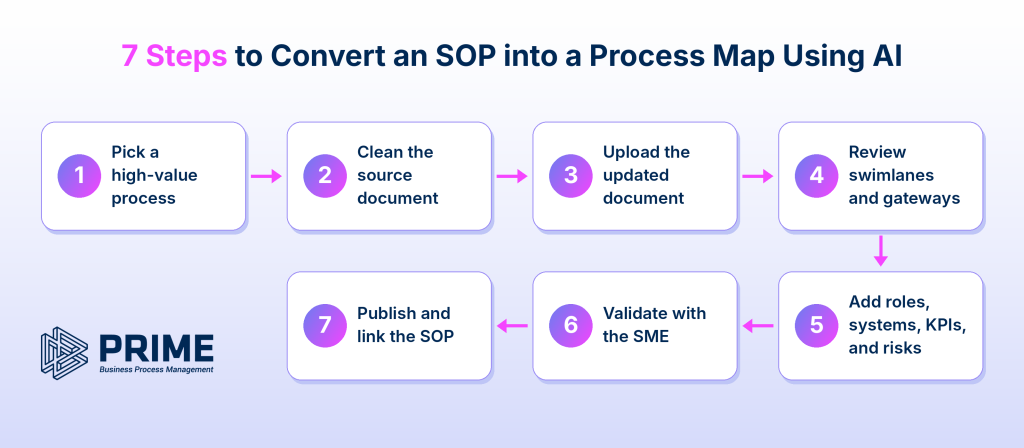
1. Pick a high-value process
Start with a procedure that involves multiple employees, departments, approvals, or handoffs.
2. Clean the source document
Check whether the SOP contains the latest instructions. Remove duplicate content, outdated information, and unnecessary text. Make sure the steps and responsibilities are clearly described.
3. Upload the updated document
Upload the SOP, manual, or other supported source file to an AI process flow generator.
4. Review the swimlanes and gateways
Check whether the correct roles have been assigned to each activity.
5. Add roles, systems, KPIs, and risks
Add relevant business rules, documents, applications, performance indicators, and operational risks wherever required.
6. Validate the map with the subject matter expert
Share the generated diagram with the process owner or employee responsible for the workflow.
7. Publish the map and link the original SOP
Once validated, publish the process map in a central repository. Link the original SOP or procedure document to the relevant activities so employees can access detailed instructions whenever required.
This approach makes existing documentation easier to understand without losing the detailed instructions contained in the original SOP.
A Practical Example: What Does an SOP Look Like as Process Maps?
Let’s understand with a small example:
This is a line written in a purchase approval procedure:
“The requester submits a purchase request to their line manager. If the value is above $5,000, the request also goes to the finance team for budget confirmation. Once approved, procurement raises the purchase order.”
This instruction explains the activities that need to be performed. But it does not immediately show how responsibilities are distributed or how the tasks are connected.
When uploaded as an image to an AI process mapping tool, it interprets the process information into a visual, easy-to-understand process map like this:
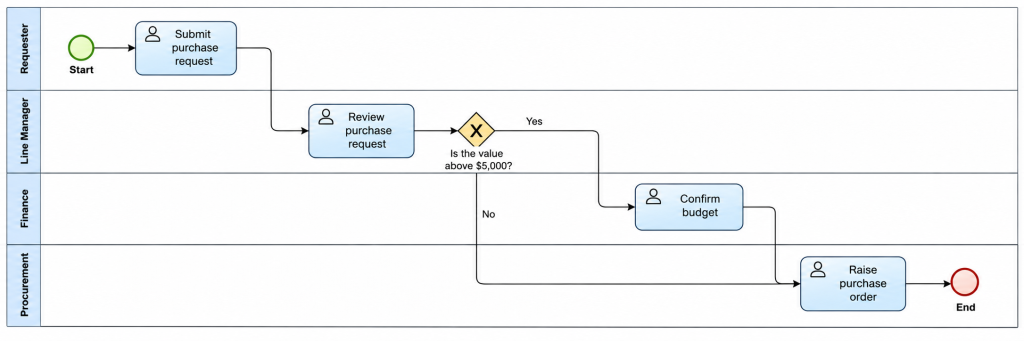
It clearly shows which department is responsible for each task, where handoffs occur, and how the process moves to the end.
This is the difference between reading an SOP (mentioned in a sentence) and viewing the same procedure as a process map (the image). As you can see, the information is the same, but the connections and sequence are now much easier to understand.
What Do AI Tools for Business Process Mapping Get Wrong?
AI can speed up process mapping, but the output is only as reliable as the information provided. However, there are a few common limitations to consider:
Undocumented activities: Employees may follow additional steps, checks, or informal workarounds that are not mentioned in the SOP. AI cannot automatically identify these activities.
Missing exception paths: An SOP may explain the standard procedure but leave out what happens when an approval is rejected, information is missing, or an unusual situation occurs.
Outdated documentation: If you provide an outdated SOP that no longer reflects how work is performed, the resulting process map also turns out to be outdated.
This is why AI-generated process maps should always go through human validation before being finalised.
Checklist to review an AI-generated process map before finalising it:
- Are all activities and handoffs represented?
- Are decision conditions and exception paths correct?
- Do the assigned roles reflect actual responsibilities?
- Does the diagram match the latest approved procedure and actual working practices?
No time to map processes in-house? Get your processes mapped for a fixed cost.
What Results Can You Expect?
The most immediate benefit of AI-based process mapping is reduced manual effort. Teams no longer need to recreate every activity and decision point from lengthy documents.
This can make large-scale documentation initiatives more manageable.
For example, a leading bank used PRIME BPM’s AI-powered process mapping capabilities to map nearly 4,000 processes in less than four weeks. This demonstrates how AI can help organisations accelerate process documentation at scale.
What Should You Look for in an AI Process Mapping Tool?
Not every AI tool offers the same capabilities.
When evaluating the best business process mapping solution for your organisation, consider the following criteria:
| Evaluation Criteria | What to Look For |
|---|---|
| BPMN compliance | Support for standard BPMN 2.0 notation and process elements. |
| Input formats | Ability to process Word, PDF, Excel, images, and other relevant source formats. |
| Attribute capture | Options to document roles, business rules, KPIs, risks, and supporting documents. |
| Data security | Clear information about data storage, access, and confidentiality. |
| Repository and approvals | Centralised process storage, version control, and approval workflows. |
It is also worth checking whether the tool supports ongoing process management rather than only diagram generation.
Some tools also offer the ability to create SOPs from process maps, helping organisations connect visual workflows with detailed written procedures.
Where Should You Start?
Start with one process this week. Choose an SOP that employees find difficult to follow or one that involves multiple approvals and handoffs.
Use AI to generate the initial map, review it with the process owner, and compare the final diagram with the original instructions. This gives your team a practical way to understand the value of AI without committing to a large-scale mapping exercise immediately.
As the approach proves useful, it can be extended to other procedures and departments.
Ready to get started?
Start a Free Trial | Book a Demo
By Mark Khabe
Co-Founder, PRIME BPM
Mark is a passionate Business Process Management and IT professional. He co-founded PRIME PMG – a Business Process Management consultancy firm and then followed with PRIME BPM – a cloud-based BPM SaaS solution. Over the last 15 years, Mark has been instrumental in strategising and implementing BPM solutions for organisations like GE, Rolls Royce, Sanofi, Suncorp, Vodafone, AMP, ATO, Pfizer, many state and local government agencies, achieve Continuous Business Improvement.